BestChange - exchange monitor, earn as an affiliate!

Thursday, September 27, 2012

Select Griview row by clicking anywhere

1. Add a CommandArgument to the link button.
<asp:LinkButton ID="LinkBtn3" runat="server" CommandName="Date" CommandArgument='<%# Eval("id") %>'  Text='<%#Eval("id") %>' Font-Underline="false" ForeColor="Black"></asp:LinkButton>
2. In the RowDataBound event
e.Row.Attributes.Add("onclick", Page.ClientScript.GetPostBackEventReference(DirectCast(sender, System.Web.UI.Control), "Select$" + e.Row.RowIndex.ToString()))
3. Then on the RowCommand Event:
If e.CommandName = "Select" Then
GrvDraft.EditIndex = e.CommandArgument
End If
4. If you get this error: Invalid postback or callback argument. Add this.
Protected Overloads Overrides Sub Render(ByVal writer As HtmlTextWriter)
For i As Integer = 0 To Me.GrvDraft.Rows.Count - 1
Page.ClientScript.RegisterForEventValidation(Me.GrvDraft.UniqueID, "Select$" & i)
Next
MyBase.Render(writer)
End Sub

Friday, September 21, 2012

Gridview with ImageURL

<asp:GridView ID="gvEmployees" runat="server" AutoGenerateColumns="False" pagesize="5" AllowPaging="True">
<Columns>
<asp:BoundField DataField="Name" HeaderText="Name" />
<asp:BoundField DataField="Team" HeaderText="Team" />
<asp:BoundField DataField="dateHired" HeaderText="Date Hired"
DataFormatString="{0:MMMM dd, yyyy}" />
<asp:BoundField DataField="empStatus" HeaderText="Employment Status" />
<asp:BoundField DataField="birthday" HeaderText="Birthday" />
<asp:BoundField DataField="civilStatus" HeaderText="Civil Status" />
<asp:BoundField DataField="noOfChildren" HeaderText="No. Of Children" />
<asp:BoundField DataField="cellphoneNo" HeaderText="Cellphone #" />
<asp:BoundField DataField="address" HeaderText="Address" />
<asp:BoundField DataField="contactPerson" HeaderText="Contact Person" />
<asp:BoundField DataField="contactNo" HeaderText="Emergency #" />
<asp:TemplateField>
<ItemTemplate>
<asp:Image ID="Image1" runat="server" ImageUrl ='<%# "~/Images/EmpImage/"+Eval("idemployee").tostring()+".png" %>' />
</ItemTemplate>
</asp:TemplateField>
</Columns>

Thursday, July 19, 2012

Encryption


1
2
3
4
5
6
7
8
9
10
11
12
13
14
15
16
17
Public Function SimpleCrypt(ByVal Text As String) As String
' Encrypts/decrypts the passed string using 
' a simple ASCII value-swapping algorithm
Dim strTempChar As String, i As Integer
For i = 1 To Len(Text)
  If Asc(Mid$(Text, i, 1)) < 128 Then
    strTempChar = _
CType(Asc(Mid$(Text, i, 1)) + 128, String)
  ElseIf Asc(Mid$(Text, i, 1)) > 128 Then
    strTempChar = _
CType(Asc(Mid$(Text, i, 1)) - 128, String)
  End If
  Mid$(Text, i, 1) = _
      Chr(CType(strTempChar, Integer))
Next i
Return Text
End Function


Monday, July 2, 2012

C++ Notes

VARIABLES
variables must be:
declared (the type of variable)
defined (values assigned to a variable)
before it can be used in a program.

DATA TYPES
C++ supports the following inbuilt data types:-
int (to store integer values),
float (to store decimal values),
char (to store characters),
bool (to store Boolean value either 0 or 1) and
void (signifies absence of information).

KEYWORDS
reserved wordsjavascript:void(0)

IDENTIFIERS
name of functions, variables, classes, arrays etc.

CONSTANTS
fixed values which cannot change.

Friday, June 29, 2012

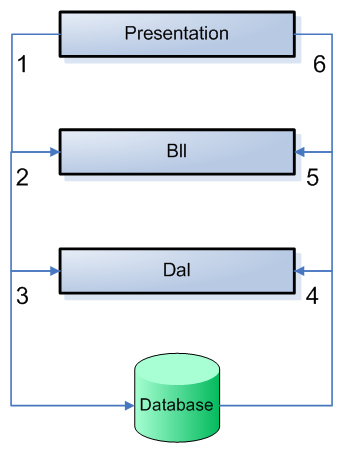
Layered Web Applications with ASP.NET

In the diagram in figure 1 you see a process go around in a counter clockwise direction. The process goes through the following 6 steps:


  1. The Presentation layer asks the BLL for some object, for example a contact person.

  2. The BLL can optionally perform some validation (for example, is the current user allowed to make this call?) and then forwards the request to the DAL.

  3. The DAL connects to the database and asks it for a specific record.

  4. When the record is found, it is returned from the database to the DAL.

  5. The DAL wraps the database data in a custom object and returns it to the BLL.

  6. Finally, the BLL returns the object to the Presentation layer, where it could be displayed on a web page for example.


Microsoft Visual Studio 2005 Express Edition full version download


Microsoft Visual Web Developer 2005 express edition offline installer download
Microsoft Visual c++ 2005 express edition offline installer download
Microsoft Visual Basic 2005 express edition offline installer download
Microsoft Visual C# 2005 express edition offline installer download
Microsoft Visual J# 2005 express edition offline installer download

InstallerSize.IMG file.ISO file
Visual Web Developer 2005
Express Edition
449,848 KB.IMG file.ISO file
Visual Basic 2005 Express Edition445,282 KB.IMG file.ISO file
Visual C# 2005 Express Edition445,282 KB.IMG file .ISO file
Visual C++ 2005 Express Edition474,686 KB.IMG file .ISO file
Visual J# 2005 Express Edition448,702 KB.IMG file .ISO file


Broken link? 
Need help in finding an ebook/pdf or installer?