BestChange - exchange monitor, earn as an affiliate!

Wednesday, September 30, 2015

Best Bitcoin Faucets As of September 2015
(By Payout)


Website Timer Payout
btc-free.eu 1400 3500
faucetpanda.com 180 3000
bitcoincran.xchange.cc 720 2500
faucetfreebitcoin.com 88 2222
breaktheco.in 420 2100
faubtcshis.com 1440 2011
alienmoneybtc.com 1440 2011

Tuesday, March 24, 2015

MongoDB for .Net Developers: Homework 1.1


Week 1: HOMEWORK 1.1

Install MongoDB on your computer and run it on the standard port.
Download the HW1-1 from the Download Handout link and uncompress it.
Use mongorestore to restore the dump into your running mongod. Do this by opening a terminal window (mac) or cmd window (windows) and navigating to the directory so that you are in the parent directory of the dump directory (if you used the default extraction method, it should be hw1/). Now type:
mongorestore dump
Note you will need to have your path setup correctly to find mongorestore.
Next, go into the Mongo shell, perform a findOne on the collection called hw1 in the databasem101. That will return one document. Please provide the value corresponding to the "answer" key from the document returned.
Answer: 42

Wednesday, March 18, 2015

Wiley: Professional Sitecore Development Free PDF Download


Professional Sitecore Development offers comprehensive information for programmers learning the CMS and experienced Sitecore developers alike. This guidance can help your organization minimize implementation cost and time to web, increasing revenue while decreasing IT costs. With this book, you will learn how to implement solutions with Sitecore, how the Sitecore architecture enhances the ASP.NET development process, how to use Sitecore’s extensive Application Programming Interfaces, and how to deploy the website.
Professional Sitecore Development provides coverage on a range of topics including:
•   Installing and configuring Sitecore
•   Implementing an information architecture and transforming content into web pages
•   Using the Sitecore security infrastructure, managing errors, and testing automatically
•   Managing Sitecore projects, optimizing performance, and scaling Sitecore solutions
•   Tips, tricks, and best practices for working with the CMS
•   Extending Sitecore and integrating external systems, including coverage of configuration, events,  pipelines, and Sitecore’s user interface technology
If you're looking for a solution for web content management, then Sitecore is your answer and this book will get you started using this valuable software today.
John West is Chief Technology Officer (CTO) in his eighth year working at Sitecore. With more than 25 years of experience designing and developing software solutions using Microsoft tools and technologies, John West is one of the most experienced Sitecore engineers in the world.

Book Details

Publisher:Wrox
By:John West
ISBN:978-0-470-93901-7
Year:
Pages:556
Language:English
File size:29.7 MB
File format:PDF

Broken link? 
Need help in finding an ebook/pdf or installer?

Send me a comment. 

Tuesday, June 10, 2014

Philippine Civil Service Exam Reviewer Free Download


Career Service Examination Reviewer
Professional/Sub-Professional

Updated Edition

Subject Coverage
Part I - Verbal Abilities in English and Filipino Vocabulary; Grammar and Correct Usage; Reading Comprehension (new exercises added) Paragraph Organization
Part II - Clerical Reasoning, Clerical Attitude and Operations including Alphabetizing, Clerical Functions and Procedures

Part III - Quantitative Analysis and Numerical Reasoning (with solutions and answers explained)

Part IV -
A. Philippine constitution
B. General Information, Current Events, Enacted Laws and Environmental Issues
C. Code of Conduct and Ethical Standards

Also you can use this as college entrance exams reviewer for PUPCET, UPCAT. ACET, etc.
Hope this helps! God bless!


Broken link? Want to say "Thank you"?
Need help in finding an ebook/pdf or installer? Send me a comment. 


Thanks me by commenting below!

Tags:
civil service exam  
civil service commission
civil service result
civil service philippines
civil service reviewer

Wednesday, May 28, 2014

Looking for a book/PDF??

Looking for a book/PDF??  

Comment below and I will try to help you find it! ^_^

Tuesday, May 6, 2014

SaveGram APK - Best Instagram Photo Downloader


Wanted to backup or copy bulk instagram photos but can find the working app??
Wanted to repost instagram pictures without watermark??
No need to use the repost app and screenshot function.
SAVEGRAM to the rescue! :D

✔ Lets you download own pictures and other public users.
✔ Backup your instagram pictures using your Android phone

App Overview
This is not an application of the official Instagram.
By using this application, you can share the moments spent with your family, friends, times of day to day. This requires that you have an account on Instagram, there you will edit your images using the filter effects in the photos, making it more beautiful! When your images are saved in your photo gallery, oh yes, our application will take action, in a simple and uncomplicated, it is possible to select the photos of your choice and with just one click and download to your smartphone!
So you use them as wallpaper, short as you wish! Everything will be saved on your phone! This application will backup your photos, making your life!
Share your happy moments!

Screenshots:


Note:
SaveGram has been removed from PlayStore. But it is a very great app that i wanted to share it to you.


Broken link? Want to say "Thank you"?
Need help in finding an ebook/pdf or installer? Send me a comment. 


Thanks me by commenting below!


Monday, March 10, 2014

How to Read the Bible for All Its Worth Free PDF Download


Understanding the Bible isn't for the few, the gifted, the scholarly. The Bible is accessible. It's meant to be read and comprehended by everyone from armchair readers to seminary students. A few essential insights into the Bible can clear up a lot of misconceptions and help you grasp the meaning of Scripture and its application to your 21st-century life. 

More than half a million people have turned to How to Read the Bible for All Its Worth to inform their reading of the Bible.

From the Back Cover

The primary task of Bible study is to determine what the Scriptures meant at the time they were written and how that meaning applies to us today. This vital guide focuses on the historical contexts of the Bible and explains differences between the Old Testament narratives, the Epistles, Gospels, Parables, Psalms and more. It's a practical approach to Bible study -- one that makes good sense and is easy to understand. This new edition includes, among other changes, a new section on the Song of Songs and an updated list of recommended commentaries and resources.

About the Author

Gordon D. Fee (Ph.D., University of Southern California) is professor of New Testament at Regent College.;Douglas Stuart (Ph.D., Harvard University) is professor of Old Testament at Gordon-Conwell Theological Seminary.


Product Details

  • Paperback: 272 pages
  • Publisher: Zondervan; 2nd edition (May 8, 1993)
  • Language: English
  • ISBN-10: 0310384915
  • ISBN-13: 978-0310384915
  • Product Dimensions: 8.2 x 5.3 x 0.6 inches
  • Shipping Weight: 7.2 ounces


Broken link? Want to say "Thank you"?
Need help in finding an ebook/pdf or installer?

Send me a comment. 

Monday, February 10, 2014

Flappy Bird 1.3 APK Free Download


Flappy Bird, the hugely successful popular free mobile game on Apple App Store and Google's Android Play store, has removed the game from the online stores. 


This insanely addictive game is now available for download for future users who feels like this. 


How to play:
> Tap to flap your wings to fly.
> Avoid pipes.
> Try to get 4 medals: Bronze, Silver, Gold (hard), Platinum (very hard)

What's New in Version 1.3:
1) Support Android 2.2
2) Fix bugs. 

Requires Android: 2.2+
Download File: 894 KB (Flappy Bird 1.3 APK)

Broken link? 
Need help in finding an ebook/pdf or installer?

Send me a comment. 

Friday, October 11, 2013

Kentico CMS 5 Website Development: Beginner's Guide


This book is written in a clear, easy-to-understand, and practical tutorial style taking the reader through relevant, real-world examples that can be put into practice immediately. Each topic is written in a practical way and is developed incrementally throughout the book. As the book progresses each chapter provides more detailed information to aid the reader in learning and understanding more about Kentico CMS and how to complete the tasks they need to build a dynamic, scalable, and responsive website. This book is designed for web developers, designers, webmasters, content editors, and marketing professionals who want to develop a fully featured web presence in a simple and straightforward process. No prior knowledge of Kentico CMS is expected. You do not require any detailed knowledge of programming or web development in order to follow this book. Any IT-confident individual will be able to use the book to produce an easy-to-navigate and usable website.


Product Details

  • Paperback: 312 pages
  • Publisher: Packt Publishing (September 21, 2010)
  • Language: English
  • ISBN-10: 1849690588
  • ISBN-13: 978-1849690584

Download

Broken link? 
Need help in finding an ebook/pdf or installer?

Send me a comment. 

Wednesday, June 19, 2013

Microsoft.ApplicationBlocks.Data DLL Download


I haven't updated this blog for a while and I have seen most of my traffic is from my post Microsoft Visual Studio Download link, might as well post this one that myself had a hard time finding.

Hop you find this post helpful!

Download here

Download here

Download here


Thursday, April 11, 2013

Perfect Keyboard Pro v1.4.4 Apk App Download


Requirements: for Android version 2.2 and higher
Overview:
Take command of your Android device's touchpad keypad with a Perfect and smart Keyboard for android. You can customize the look of the keyboard with eight different themes and add additional functionality to your device. Perfect Keyboard lets you use custom dictionaries, control background and text colors, and adjust the keyboard's vibration density. In short, Perfect Keyboard allows you to setup your Android phone or tablet's touchpad keyboard so that it works best for you.

 Note: Perfect Keyboard works only on Android 2.2 and up

 Detailed Specifications:

 - Multitouch keyboard
 - User dictionary, built-in dictionary, supports AnySoftKeyboard International dictionaries (separate downloads from the Market)
 - Configurable auto correction
 - Redesigned and optimized keyboard layout and style
 - 8 Keyboard themes ( gingerbread,iPhone and more).
 - Configurable colors for the keyboard buttons, background and text
 - Configurable color for the word suggestion font
 - Speech to text (select languages only)
 - Custom vibration intensity (haptic feedback)
 - Long press "Enter" key to bring up smiley alternatives
 - Long press on "/" key in URL mode to bring up domains (you can configure the domains in the settings to better fit)
 - Configurable sound style and volume ( Samsung,iPhone,android)
 - Cursor Keys - swipe up on the space key to display.
 - Gestures.
 - Shortcuts (auto-text)
 - External skins (some of better keyboard skins)
 - Alt symbols on the keyboard.
 - configure the layout of the keyboard (key height,row gap etc)
 Tips:

 #Change Appearance and Themes:
 To change appearance go to settings -> appearance

 #About "collecting data" warning message:
 That warning message is a part of the Android operating system, and it appears whenever a thirdparty keyboard is enabled. You don't have to worry because the keyboard don't have permission to internet access.

 Supported languages layout: English, French, Hebrew, Arabic, German, Czech(QWERTY,QWERTZ), Bulgarian, Catalan, Spanish, Esperanto, Danish, Italian, Finnish, Georgian, Russian, Ukrainian, Latvian, Swedish,Latin, Dutch, Portuguese, Slovakian, Slovenian, Greek, Rumanian, Serbian, Hungarian


 tags: android keyboard,gingerbread keyboard,keyboards

 What's in this version:
 Fix Latvian layout.
 Bug fixes.
 New option to change the size of suggestions bar.
 Better ICS compatibility


Broken link? 
Need help in finding an ebook/pdf or installer?

Send me a comment. 

Friday, October 12, 2012

Reset MySQL root password – Windows 7

STEP #1: Go to START / CONTROL PANEL and click on System and Security
STEP #2: Click on Administrative Tools and select Services
STEP #3: Scroll down and stop MYSQL service
STEP #4: Now go to START / ALL PROGRAMS / ACCESSORIES and right click on Command Prompt – Select RUN as Administrator
STEP #5: Repeat it so you have two Command prompt windows running on your desktop.
STEP #6: In each of the Command prompt windows navigate to 
C:\Program Files\Mysql\Mysql server 5.1\bin>
STEP #7: In first Command prompt window type: mysqld.exe –skip-grant-tables and press ENTER
STEP #8: Go to second Command prompt window and type: mysql.exe –u root mysql and press ENTER, you should be granted access and be in mysql> prompt
STEP #9: Now while at the mysql> type here UPDATE mysql.user SET Password=PASSWORD(‘new password’) WHERE User=’root’ and press ENTER
STEP #10: If everything worked, you should receive QUERY OK
STEP #11: Now type FLUSH PRIVILLEGES; and press ENTER, you will receive another Query OK
STEP #12: Now you have to just reboot your machine and once you are back you should be able to log on with your new password. 


Thursday, September 27, 2012

Select Griview row by clicking anywhere

1. Add a CommandArgument to the link button.
<asp:LinkButton ID="LinkBtn3" runat="server" CommandName="Date" CommandArgument='<%# Eval("id") %>'  Text='<%#Eval("id") %>' Font-Underline="false" ForeColor="Black"></asp:LinkButton>
2. In the RowDataBound event
e.Row.Attributes.Add("onclick", Page.ClientScript.GetPostBackEventReference(DirectCast(sender, System.Web.UI.Control), "Select$" + e.Row.RowIndex.ToString()))
3. Then on the RowCommand Event:
If e.CommandName = "Select" Then
GrvDraft.EditIndex = e.CommandArgument
End If
4. If you get this error: Invalid postback or callback argument. Add this.
Protected Overloads Overrides Sub Render(ByVal writer As HtmlTextWriter)
For i As Integer = 0 To Me.GrvDraft.Rows.Count - 1
Page.ClientScript.RegisterForEventValidation(Me.GrvDraft.UniqueID, "Select$" & i)
Next
MyBase.Render(writer)
End Sub

Friday, September 21, 2012

Gridview with ImageURL

<asp:GridView ID="gvEmployees" runat="server" AutoGenerateColumns="False" pagesize="5" AllowPaging="True">
<Columns>
<asp:BoundField DataField="Name" HeaderText="Name" />
<asp:BoundField DataField="Team" HeaderText="Team" />
<asp:BoundField DataField="dateHired" HeaderText="Date Hired"
DataFormatString="{0:MMMM dd, yyyy}" />
<asp:BoundField DataField="empStatus" HeaderText="Employment Status" />
<asp:BoundField DataField="birthday" HeaderText="Birthday" />
<asp:BoundField DataField="civilStatus" HeaderText="Civil Status" />
<asp:BoundField DataField="noOfChildren" HeaderText="No. Of Children" />
<asp:BoundField DataField="cellphoneNo" HeaderText="Cellphone #" />
<asp:BoundField DataField="address" HeaderText="Address" />
<asp:BoundField DataField="contactPerson" HeaderText="Contact Person" />
<asp:BoundField DataField="contactNo" HeaderText="Emergency #" />
<asp:TemplateField>
<ItemTemplate>
<asp:Image ID="Image1" runat="server" ImageUrl ='<%# "~/Images/EmpImage/"+Eval("idemployee").tostring()+".png" %>' />
</ItemTemplate>
</asp:TemplateField>
</Columns>

Thursday, July 19, 2012

Encryption


1
2
3
4
5
6
7
8
9
10
11
12
13
14
15
16
17
Public Function SimpleCrypt(ByVal Text As String) As String
' Encrypts/decrypts the passed string using 
' a simple ASCII value-swapping algorithm
Dim strTempChar As String, i As Integer
For i = 1 To Len(Text)
  If Asc(Mid$(Text, i, 1)) < 128 Then
    strTempChar = _
CType(Asc(Mid$(Text, i, 1)) + 128, String)
  ElseIf Asc(Mid$(Text, i, 1)) > 128 Then
    strTempChar = _
CType(Asc(Mid$(Text, i, 1)) - 128, String)
  End If
  Mid$(Text, i, 1) = _
      Chr(CType(strTempChar, Integer))
Next i
Return Text
End Function


Monday, July 2, 2012

C++ Notes

VARIABLES
variables must be:
declared (the type of variable)
defined (values assigned to a variable)
before it can be used in a program.

DATA TYPES
C++ supports the following inbuilt data types:-
int (to store integer values),
float (to store decimal values),
char (to store characters),
bool (to store Boolean value either 0 or 1) and
void (signifies absence of information).

KEYWORDS
reserved wordsjavascript:void(0)

IDENTIFIERS
name of functions, variables, classes, arrays etc.

CONSTANTS
fixed values which cannot change.

Friday, June 29, 2012

Layered Web Applications with ASP.NET

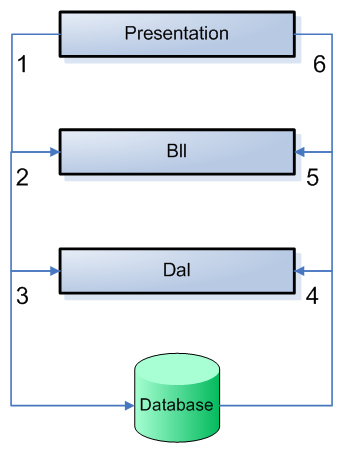
In the diagram in figure 1 you see a process go around in a counter clockwise direction. The process goes through the following 6 steps:


  1. The Presentation layer asks the BLL for some object, for example a contact person.

  2. The BLL can optionally perform some validation (for example, is the current user allowed to make this call?) and then forwards the request to the DAL.

  3. The DAL connects to the database and asks it for a specific record.

  4. When the record is found, it is returned from the database to the DAL.

  5. The DAL wraps the database data in a custom object and returns it to the BLL.

  6. Finally, the BLL returns the object to the Presentation layer, where it could be displayed on a web page for example.


Microsoft Visual Studio 2005 Express Edition full version download


Microsoft Visual Web Developer 2005 express edition offline installer download
Microsoft Visual c++ 2005 express edition offline installer download
Microsoft Visual Basic 2005 express edition offline installer download
Microsoft Visual C# 2005 express edition offline installer download
Microsoft Visual J# 2005 express edition offline installer download

InstallerSize.IMG file.ISO file
Visual Web Developer 2005
Express Edition
449,848 KB.IMG file.ISO file
Visual Basic 2005 Express Edition445,282 KB.IMG file.ISO file
Visual C# 2005 Express Edition445,282 KB.IMG file .ISO file
Visual C++ 2005 Express Edition474,686 KB.IMG file .ISO file
Visual J# 2005 Express Edition448,702 KB.IMG file .ISO file


Broken link? 
Need help in finding an ebook/pdf or installer?

Tuesday, June 26, 2012

Get values of selected row in Datagrid

1
2
3
4
5
6
    Protected Sub gvPhonebook_SelectedIndexChanged(sender As Object, e As System.EventArgs) Handles gvPhonebook.SelectedIndexChanged
Dim i As Integer = gvPhonebook.SelectedRow.RowIndex
txtGSMNo.Text = gvPhonebook.Rows(i).DataItem("gsmno")
txtName.Text = gvPhonebook.Rows(i).DataItem("name")
ddlTeams.Text = gvPhonebook.Rows(i).DataItem("team")
End Sub